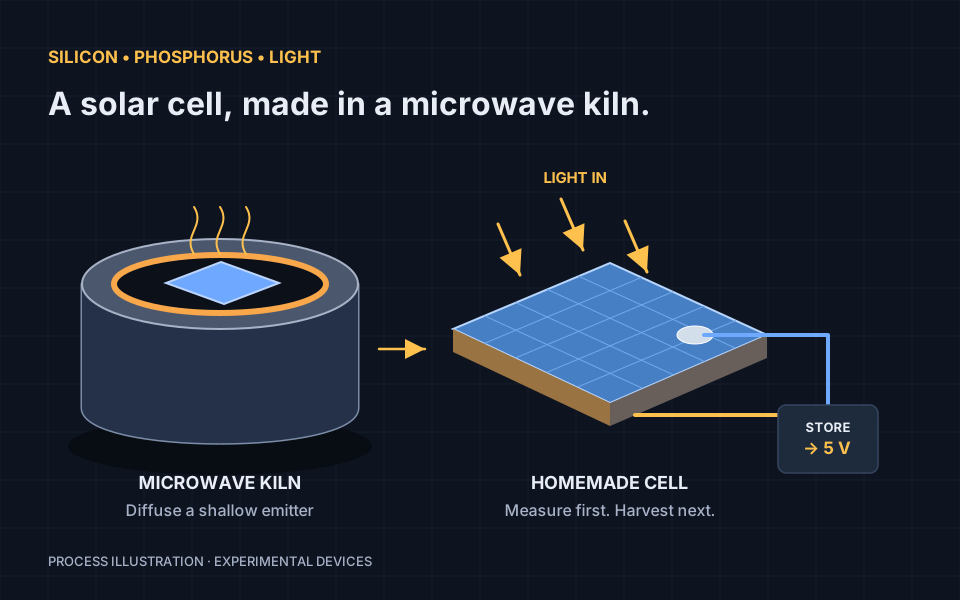
A solar cell starts with a junction. In this build, I put a phosphorus-bearing glass on one face of p-type silicon, heat it in a small microwave kiln to diffuse phosphorus into the surface, and add contacts to the two sides. Light on the finished junction produces electrical power.
The result is a homemade cell. Connect several cells and you have a small panel. An energy harvester can collect their output into a battery, and a separate boost converter can provide 5 V USB power. This is a device-making experiment: measure the power you actually get before choosing a load.
What we are making
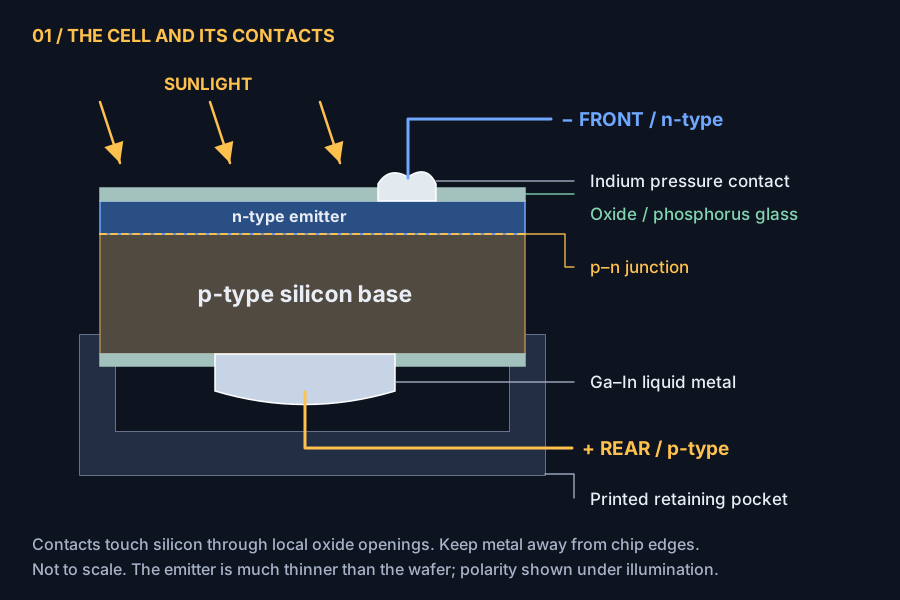
Phosphorus is a donor in silicon. Where enough electrically active phosphorus enters the p-type wafer, the surface becomes n-type; the bulk stays p-type. The boundary between them is the p–n junction. The glass is a dopant source and an electrical insulator, so contacts need openings through it. Select any diagram to open it at full size.
Before starting. This involves sharp silicon, flammable solvents, corrosive chemicals, and a kiln around 1,000 °C. Use a suitable laboratory workspace with ventilation, eye protection, and chemical-specific PPE. Dedicate the microwave and utensils to materials work; never return them to food use. The HF route has additional requirements described below.
Tools, materials, and example suppliers
These links are examples, not a required shopping list. Feel free to look around for alternatives and better prices. Match the material specifications, check the current listing and SDS, and compare quantities and shipping. Marketplace listings and short links can change; a similar product name does not guarantee the same chemistry or electronics.
| Item | Example source | What matters |
|---|---|---|
| p-type silicon wafer | Silicon wafer | Confirm p-type, (100) orientation, and resistivity. My base doping was approximately 10¹⁶ cm⁻³. Avoid a pre-oxidized wafer for this starting recipe. |
| Diamond or silicon carbide scribe | Scribe | A sharp tip for initiating a cleave. |
| Isopropyl alcohol | Rubbing alcohol | Plain, additive-free IPA; high-purity IPA is preferable to antiseptic blends. |
| Distilled water | Water | Fresh distilled water for this experiment; DI water is an upgrade. |
| Anhydrous ethanol | Ethanol | Check water content and denaturants; water changes the sol chemistry. |
| Tetraethyl orthosilicate (TEOS) | TEOS | Glass precursor, with known purity. |
| Phosphoric acid | Phosphoric acid | 85% by weight aqueous acid was used here. |
| Stirring hotplate | Hotplate | Compatible lab vessel and stir bar; no sealed heating. |
| PC fan and supply | Fan | Match its rated supply and wiring; use a guarded, balanced mounting fixture. |
| Polyimide tape | Kapton-style tape | Temporary mask and mounting only; remove before firing. |
| 900 W microwave | Microwave | Dedicated to this experiment; intact door and interlocks. |
| Small microwave kiln | Kiln | The small style was used, not the large one. Confirm temperature and microwave compatibility. |
| 2000-grit wet/dry abrasive | Sandpaper | For local mechanical contact openings. |
| HF-containing rust remover, optional lab route | Whink | Read the HF section before considering this route. |
| Crucible, gallium, indium | Crucible, Ga, In | Known metal purity; use a compatible crucible, not aluminum. |
| Fixtures and test equipment | Source locally | Printed pocket, insulated wire, tape, tweezers, balance, pipettes, compatible lab containers, flat glass support for mechanical polishing only, multimeter, and load resistors. |
| Electronics | Example source | Check before connecting |
|---|---|---|
| BQ25570 energy harvester board | Harvester | Input startup requirements, MPPT ratio, battery voltage thresholds, and actual board schematic. |
| IP5310 USB boost / power-bank board | USB output | Battery voltage configuration, standby drain, low-load shutdown, and connector roles. |
| Single-cell Li-ion / LiPo battery | Battery | Listing describes a 3.7 V, 3,000 mAh protected pack. Verify the actual pack, charge limits, protection, and connector polarity. |
Step 1: Cleave small silicon squares
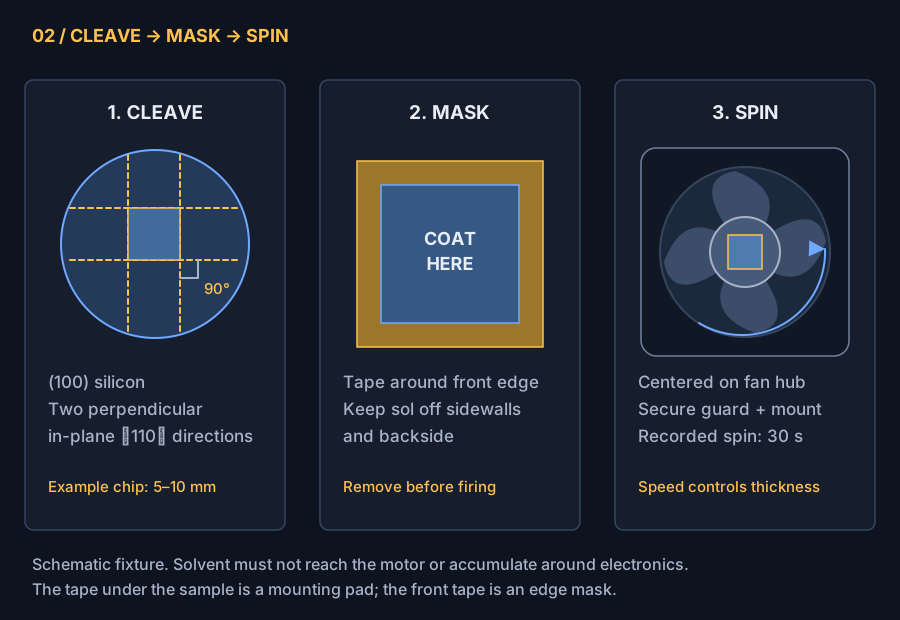
Start with a (100)-oriented p-type wafer. Its two in-plane ⟨110⟩ directions are perpendicular, so aligned cleaves can produce rectangular pieces. The crystal orientation matters: arbitrary scribe lines are not guaranteed to break cleanly. Confirm the supplier’s flat/notch convention rather than assuming every wafer is marked the same way. Wafer orientation reference.
Use a diamond or silicon carbide scribe to start a short score at an edge, then cleave over a suitable support with controlled pressure. Work into strips, rotate 90°, and cleave the strips into squares. A roughly 5–10 mm square is a convenient starting size, not a required dimension. Practice on a sacrificial piece first. Wear eye protection, contain fragments, and collect sharp scraps with tools rather than your fingers.
Rinse away particles with distilled water, clean with plain IPA, rinse with fresh distilled water, and dry without touching the active surface. I used plastic cups for the cleaning; use clean containers whose material is compatible with the liquid, rather than assuming any drinking cup will do. Handle the pieces at the edges with clean tweezers. This removes loose debris and oils; it does not remove native silicon oxide or replace a semiconductor wafer clean.
Step 2: Make the phosphorus-bearing coating
This is a TEOS-based sol that becomes phosphorus-containing glass during drying and heating. The batch I used was:
| Ingredient | Volume |
|---|---|
| TEOS | 1.00 mL |
| Distilled water | 0.25 mL |
| Anhydrous ethanol | 5.00 mL |
| Phosphoric acid, 85 wt% in water | 0.30 mL |
The acid brings additional water into the mixture. Keep its concentration in your notes: substituting dilute phosphoric acid while keeping the same volume changes both the phosphorus loading and the hydrolysis chemistry. The phosphorus concentration in the liquid is not the final active donor concentration in silicon.
Use clean, compatible lab glassware and a stir bar under suitable exhaust. Mix the TEOS and ethanol, then introduce the water and acid gradually with stirring, allowing any warming to subside. Record mixing time, temperature, and aging time; these affect viscosity and coating thickness. This batch has no established shelf life or calibrated film-thickness recipe.
Do not boil this mixture in a sealed container. My original notes described sealed, heated stirring; that is not a safe instruction to repeat. Ethanol vapor can ignite and a heated sealed vessel can pressurize. Use room-temperature stirring for initial process trials; heated sol preparation requires a properly vented laboratory reflux setup and a suitable procedure. TEOS itself is flammable and presents inhalation hazards. TEOS SDS.
Mask and spin one face
Mask a narrow border around the front face with polyimide tape. The aim is to keep the wet coating off the sidewalls and backside; a phosphorus-doped path around the edge can shunt the device. Choose a border wide enough for your handling accuracy and record the remaining coated area.
I folded tape back on itself to make a double-sided mounting pad and attached the silicon to the center of a PC fan hub. My original splash enclosure was a cardboard box. For a repeatable fixture, use a stable, solvent-compatible guard that contains both splashes and a detached chip. Keep solvent away from the fan electronics; an ordinary PC fan is not rated for flammable vapor.
With the fan stopped, wet the exposed front face with a small amount of sol. Secure the enclosure and spin for 30 seconds, as in my build. Let the fan stop before reaching in. Record the speed if you can measure it: time alone does not determine film thickness. A proper enclosed spin coater is an upgrade.
Remove the sample and all tape, including the underside mounting pad. Allow solvent to leave under appropriate exhaust and use a controlled drying step suitable for the sol before firing. Do not load a wet, solvent-bearing chip into the microwave. The original notes do not establish a drying/bake schedule, so record this step in your own process log.
Step 3: Diffuse in a microwave kiln
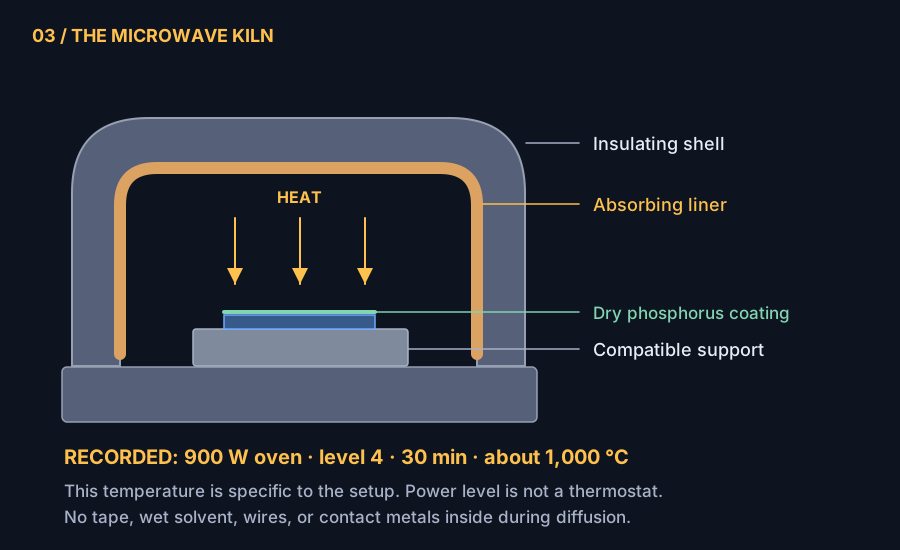
A microwave kiln contains an absorbing liner, or susceptor, that converts microwave energy into heat. The hot enclosure heats the sample. This is not a bare wafer placed on a microwave turntable. Example kiln construction.
| My setup | Recorded condition |
|---|---|
| Microwave | 900 W rated output |
| Kiln | Small microwave kiln |
| Program | Power level 4 for 30 minutes |
| Kiln temperature | Approximately 1,000 °C in this setup |
| Atmosphere | Ambient air; moisture not controlled |
Place the dry, tape-free piece coating-side up on a clean, high-temperature, kiln-compatible support, with no contact metals or wires attached. Avoid contaminating the wafer with the kiln liner. Follow the kiln’s loading, clearance, handling, and cooling instructions; do not exceed its ratings. Allow it to cool fully before handling the wafer or adding contacts.
Power level 4 is not a temperature setpoint. Many microwaves duty-cycle their full output, and the kiln size, loading, heat loss, and oven all affect temperature. If level 4 represents 40% duty cycle, the nominal average is 360 W; that arithmetic does not establish 1,000 °C. The 30-minute program also includes warmup, rather than necessarily providing 30 minutes at temperature. Use only microwave-compatible temperature measurement; do not improvise a metal thermocouple feedthrough or defeat the door interlocks.
How deep might the junction be?
A useful first estimate is a few tenths of a micrometer. For a hypothetical 30-minute hold at 1,000 °C, the simple model below gives about 0.38 µm at my approximate base doping of 10¹⁶ cm⁻³. This is a calculated scenario, not a measured junction depth or a guarantee that the coating forms that profile.
Assume one-dimensional diffusion, a constant electrically active surface concentration Cₛ = 10²⁰ cm⁻³, and concentration-independent diffusivity. The standard constant-source solution is:
xⱼ = 2√(Dt) · erfc⁻¹(Nₐ / Cₛ)
Here Nₐ is the acceptor concentration, and the metallurgical junction is where the donor profile equals Nₐ. It is not the depletion-region width. Constant-source diffusion model.
Using the University of Illinois diffusivity table, D ≈ 2.6 × 10⁻¹⁴ cm²/s at 1,000 °C and t = 1,800 s. The calculated sensitivity is:
| Assumed constant temperature | Nₐ = 10¹⁵ cm⁻³ | Nₐ = 10¹⁶ cm⁻³ | Nₐ = 10¹⁷ cm⁻³ |
|---|---|---|---|
| 900 °C | 0.10 µm | 0.09 µm | 0.08 µm |
| 950 °C | 0.22 µm | 0.19 µm | 0.16 µm |
| 1,000 °C | 0.43 µm | 0.38 µm | 0.32 µm |
| 1,050 °C | 0.81 µm | 0.71 µm | 0.60 µm |
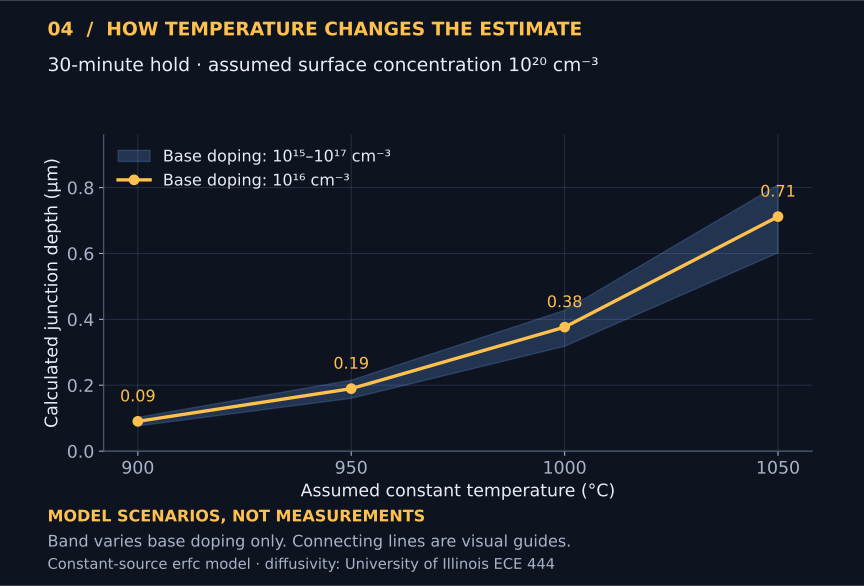
At 1,000 °C and Nₐ = 10¹⁶ cm⁻³, changing the assumed Cₛ from 10¹⁹ to 10²¹ cm⁻³ gives approximately 0.32–0.43 µm in this same model. Surface activation, finite dopant supply, and high-concentration diffusion can all invalidate that simple approximation. The range is for exploring sensitivity, not a set of bounds on the real device.
What about humidity?
Water vapor affects oxidation, the dopant source, and diffusion conditions; research has measured different phosphorus diffusion behavior in inert and oxidizing atmospheres. Room humidity does not specify the water-vapor pressure inside a hot, outgassing kiln, so there is no defensible single “humidity correction” to apply here. Phosphorus diffusion under oxidizing atmospheres.
For a recorded temperature history, replace Dt by ∫D[T(t)] dt within the same model. A long warmup lowers the effective thermal budget relative to an equal-length hold at the peak. Sheet resistance is a useful process check, but a measured junction depth requires a profile measurement such as spreading resistance or SIMS interpreted with activation information.
Step 4: Open the oxide at the contacts
The phosphorus glass and any grown oxide insulate the surface. You need one clean contact opening on each side, not necessarily a fully polished wafer. On the front, preserve the shallow n-type layer: cutting through it can put your metal on the p-type base or short the junction.
Mechanical route: local wet polishing
I used 2000-grit sandpaper, a tiny amount of water, and a flat glass backing to support the silicon. Work only a small intended contact area with light, even pressure. Support the wafer across its area and avoid bending it. Rinse away the slurry and dry before making contact; keep the residue wet during cleanup to avoid airborne dust. Do the same for the rear contact spot.
In my trials, I estimated roughly 10 nm per swipe with more uniform pressure and 30 nm or more per swipe when pressure was concentrated; sometimes one swipe was enough. These are rough observations from that setup, not calibrated removal rates. Abrasive size, pressure, support, oxide thickness, and scratches all matter. Do not infer remaining emitter thickness from a swipe count. Use a sacrificial piece while developing the method.
Chemical route: HF, for an equipped lab
I also tried Whink Rust Stain Remover for about 30 minutes, followed by a distilled-water rinse. That records the experiment, not an established etch endpoint. My original notes called it “about 1% HF”; the manufacturer’s SDS for SKU 1232 lists 1.0–2.5 wt% hydrofluoric acid. Check your exact bottle’s current SDS; other Whink formulations are different. Whink 1232 SDS.
HF can cause deep burns and systemic poisoning, and pain may be delayed. A dilute consumer product is still hazardous. Use this route only with HF training, an approved procedure, a suitable fume hood, compatible PPE and containers, a buddy, and an HF emergency plan with calcium gluconate provision. Do not use glass or improvised drinking cups. My use of Solo cups is not a setup to copy. Collect the etchant and contaminated rinses as hazardous waste; do not pour them down the drain. If exposed, immediately flush with running water, remove contaminated clothing, and seek emergency medical help—do not wait for pain. Tell responders it is HF. CDC hydrogen fluoride guidance and HF laboratory safety guidance.
Make the contacts soon after opening the surfaces; clean silicon reoxidizes in air. Neither a water rinse nor a shiny-looking spot proves a low-resistance electrical contact.
Step 5: Add soft metal contacts
Rear p-type contact: gallium–indium eutectic
Use 75.5% gallium and 24.5% indium by mass, not by volume. For a 1.000 g batch, weigh 0.755 g Ga + 0.245 g In. EGaIn melts around 15.7 °C, so the finished alloy is normally liquid at room temperature. EGaIn material reference.
I combined the metals in a crucible and warmed them to about 150 °C while mixing. Pure indium melts near 157 °C, but it can dissolve into molten gallium below that temperature; a uniform alloy need not start with two fully molten pure metals. Mix until there are no remaining indium pieces, and let the alloy cool before bringing it near a printed fixture. Use dedicated compatible tools and keep gallium away from aluminum.
My 3D-printed pocket holds a small amount of EGaIn against the exposed rear p-type contact area. Seat an electrical lead in the alloy and provide strain relief outside the pocket. Keep the liquid contained and clear of the sidewalls and front contact. The printed part is a room-temperature holder, not a kiln fixture or a vessel for 150 °C alloy.
Front n-type contact: indium
I pressed a small piece of indium onto the opened front n-type region with a gloved finger. It is soft—rather like used chewing gum. A clean blunt tool gives more controlled pressure and keeps your hand away from sharp edges. Support the wafer and use only enough pressure to establish contact.
Press a wire into contact with the indium and tape it down for strain relief. Ordinary tape is not the electrical connection: the wire must physically touch the metal. Keep this contact small so it does not shade much of the cell.
These are experimental pressure contacts, not guaranteed ohmic contacts. Surface oxide, emitter doping, and pressure can make them resistive or rectifying. Confirm their behavior electrically before blaming the junction. When the cell generates power, the rear p-contact is positive and the front n-contact is negative.
Step 6: Measure the cell before adding electronics
Boom: a piece of silicon you processed yourself, now ready for the light test. Disconnect the battery and all converter boards so they cannot masquerade as solar output. Keep illumination, angle, and temperature consistent while comparing readings; avoid heating the sample with a close lamp.
- Open-circuit voltage, VOC. Put the meter in DC voltage mode, red lead on the rear p-contact, black on the front n-contact. Compare light and dark.
- Loaded power. Place a known resistor across the cell and measure its voltage. Calculate I = V/R and P = V²/R. Try several resistances, for example 100 kΩ, 10 kΩ, 1 kΩ, and 100 Ω, then refine around the best power point. A near-zero voltage at a low resistance can simply mean the load is too heavy.
- Short-circuit current, ISC, if needed. With only the cell connected, use the meter’s fused current input and a suitable range for a brief measurement. Never place a current-mode meter across the battery. Return the lead to the voltage socket afterward.
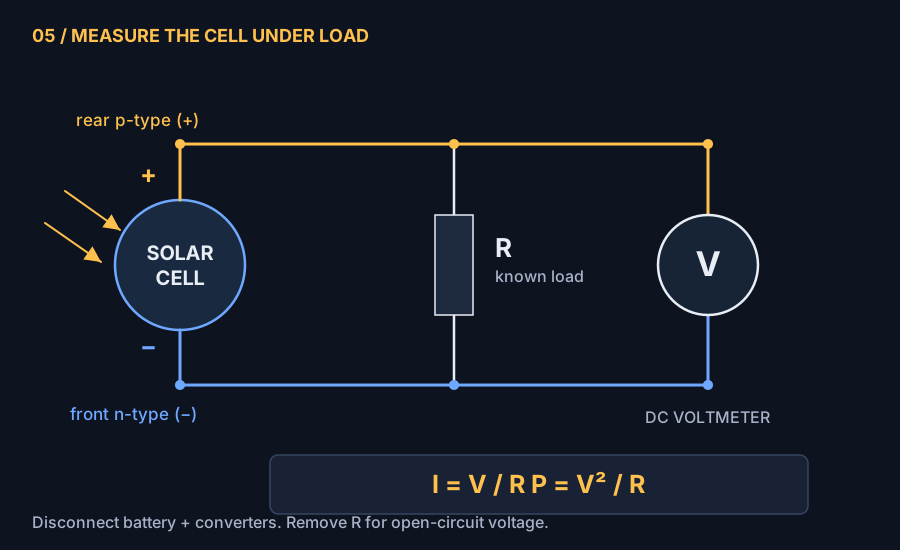
Record cell dimensions, coated area, contact area, illumination, temperature, VOC, and the best measured loaded voltage/current. VOC × ISC is not usable output power: those values occur at different operating points. Calculate efficiency only if you also measure incident optical power over a defined area. No measured voltage, current, or efficiency is claimed for this build here.
Step 7: Harvest energy and produce USB power
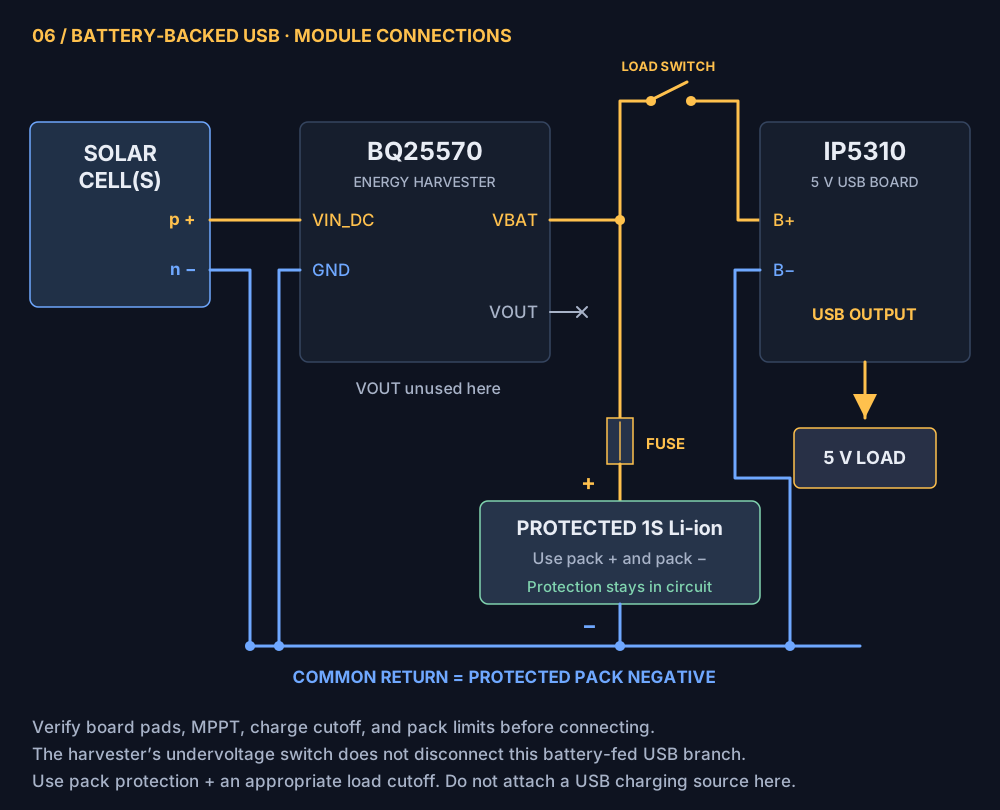
The arrangement is solar cell → harvester → protected battery → 5 V boost converter → USB load. The battery stores slow incoming energy and supplies short bursts of higher power. It does not increase the long-term energy yield.
First solve startup
The BQ25570 specifies a 600 mV typical cold-start input, with 700 mV maximum in its electrical-characteristics table. Once started, it can harvest from inputs down to 100 mV, provided its operating conditions are met. Those are different requirements. A single weak cell can fail to start it even though the meter shows voltage. Startup also needs sufficient input power. TI BQ25570 datasheet, section 6.5.
If needed, connect two or more tested cells in series: connect the p-positive contact of one to the n-negative contact of the next, leaving one free negative and one free positive terminal for the harvester. Voltages add; available current is limited by the weaker cell. Two is a starting trial, not a guaranteed count. Verify startup under load and keep total open-circuit voltage within the board’s input limits in the brightest expected light. Parallel connection increases current but does not solve insufficient startup voltage.
Connect and configure the boards
- Connect cell/panel p-positive to the harvester solar input (VIN_DC) and n-negative to input ground. Use the board documentation to identify pads.
- Configure the harvester’s storage overvoltage and MPPT settings for the measured source and battery. For a conventional 4.20 V maximum Li-ion pack, the worst-case charge cutoff, including resistor and IC tolerances, must stay within the pack specification. Do not assume a generic board’s factory resistor settings are suitable.
- Connect the harvester’s battery/storage connection (VBAT) to the protected battery terminals, through an appropriately rated fuse close to pack positive. Match charging current and temperature requirements to the cell datasheet. Battery protection is a backup, not a substitute for a correctly configured charger.
- Feed the USB board’s B+ and B− battery terminals from the protected battery, using a switch in its positive feed so it can be fully disconnected while energy accumulates. Size the fuse and wiring for the battery-side current of your intended load. Do not feed it from the BQ25570’s regulated VOUT, which is a buck output rather than a 5 V USB supply.
- Enable USB output only after enough energy is stored. All returns in this diagram join at protected pack negative. Since the USB load is connected directly to the pack, the harvester’s own undervoltage disconnect does not isolate that load; use the protected pack and a suitable load cutoff.
The IP5310 is a power-bank controller with its own charging function and automatic low-load behavior. For this arrangement, use it as a battery-to-USB output stage. Do not connect a separate USB charging source while the solar charger is attached unless the complete dual-charger system has been reviewed. Some small loads will trigger automatic shutdown. Check the board’s battery voltage configuration and USB connector directions. IP5310 manufacturer datasheet.
A 5 V output is not a promise of phone-charging power
For an illustrative, unmeasured 1 mW cell output and 70% combined conversion efficiency, ignoring standby losses:
An hour at that rate collects about 0.7 mWh, enough ideally for roughly 5 seconds at 5 V, 100 mA. Real standby and storage losses reduce this. The example 3,000 mAh, 3.7 V pack stores nominally about 11.1 Wh; at a hypothetical net 1 mW charging power, an ideal empty-to-full charge takes 11,100 hours of illumination. A smaller storage device matched to the load may be more useful for a demonstration. Measure converter standby drain: it can consume all the energy a tiny cell produces.
If it does not work yet
| Symptom | Check next |
|---|---|
| Little or no light-dependent voltage | Confirm starting wafer type, contact polarity, oxide openings, and that diffusion actually created an emitter. Compare a processed sample with an unprocessed control. |
| Voltage looks good, but collapses into a load | Try a lighter load; inspect contact resistance, emitter continuity, and illuminated area. |
| Near-short in both directions | Look for metal or dopant wraparound, a cracked wafer, or polishing through the front emitter. |
| Reading changes when a wire moves | Improve metal-to-wire contact and mechanical support; tape alone does not conduct. |
| Cell works, harvester does not start | Measure input during startup, try series cells, and check board thresholds and input power. |
| USB works briefly, then stops | Check stored energy, pack protection, boost standby current, and automatic low-load shutdown. |
For the next iteration, keep a process log: wafer type and doping, chip area, sol age, spin speed, drying, temperature history, oxide-opening method, contact geometry, and loaded power. Change one variable at a time. That is how a one-off light response becomes a process you can reproduce.
Related: Making LEDs From an Epiwafer and more experiments on Dr.Semiconductor.